
Platform Overview

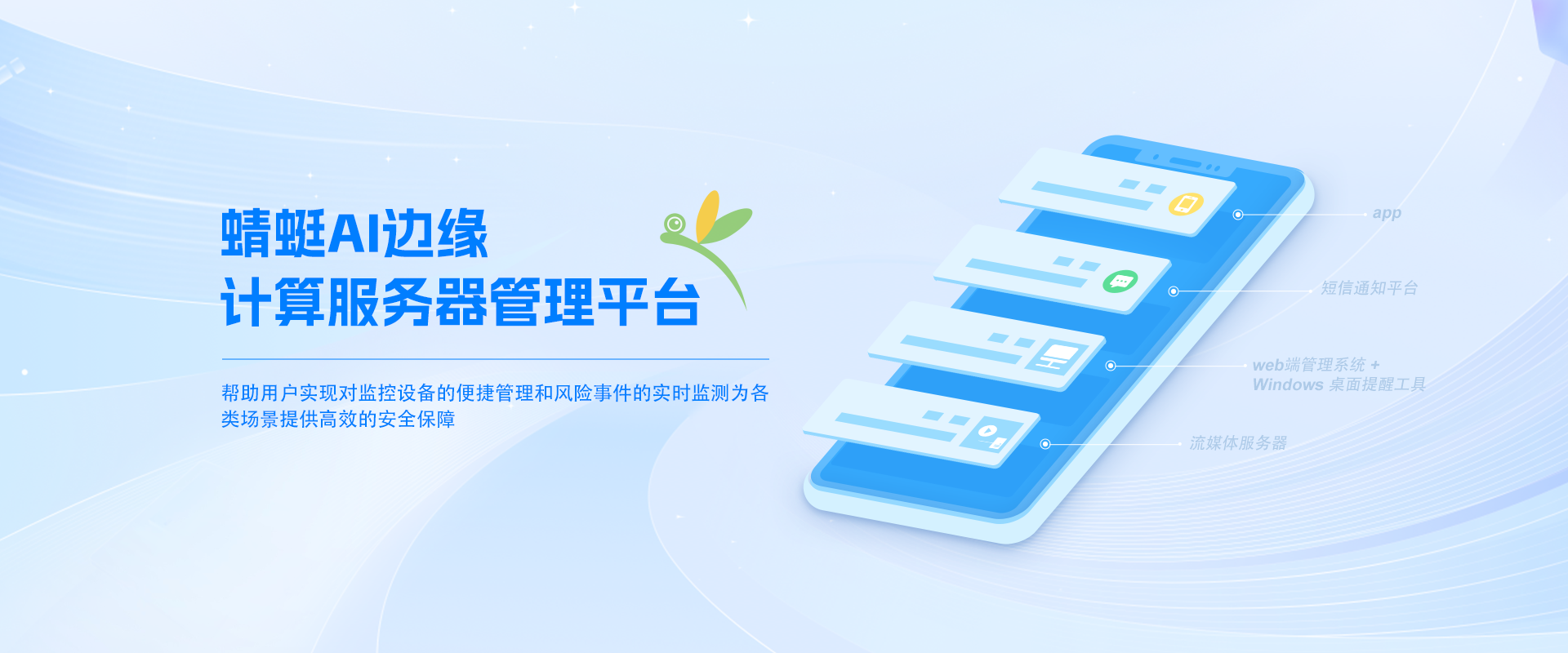
Dragonfly AI Edge Computing Server Management Platform is an AI-based video risk monitoring and management platform. The platform integrates multiple modules, including a Web-based management system, streaming media server, mobile App, Windows desktop alert tool, and SMS notification platform. Through these functions, users can conveniently configure and manage cameras and other devices while flexibly adding, deleting, adjusting, and viewing monitoring data. Using advanced artificial intelligence technology, the platform can automatically identify and analyze video content and monitor risk events in real time. Users can view live surveillance footage anytime and anywhere through the Web-based management system or mobile App and receive real-time alarm information. In addition, the Windows desktop alert tool and SMS notification platform provide users with multiple warning methods to ensure they do not miss any important security event.

The platform offers highly flexible configuration and management functions. Users can easily add, delete, or adjust cameras and other devices to achieve customized management of the surveillance system. In addition, we support multiple security protection mechanisms, including data encryption, permission management, and access control, to ensure the confidentiality and integrity of surveillance data and safeguard users' data security. Dragonfly AI Edge Computing Server Management Platform is a feature-rich, secure, and reliable video risk monitoring and management platform. Using artificial intelligence technology, it provides flexible configuration and management functions, helping users conveniently manage surveillance devices and monitor risk events in real time, delivering efficient security assurance for various scenarios.
Web Management System

The Web management system is an AI-based video risk monitoring and management system. It includes modules such as Dashboard, Real-time Monitoring, AI Risks, AI Monitoring, Device Alerts, Risk Statistics, Resource Management, Alert Settings, Upgrade Management, Basic Information Management, Face Recognition Management, Third-Party Platform Management, and System Management. The specific functions are as follows:

Dashboard

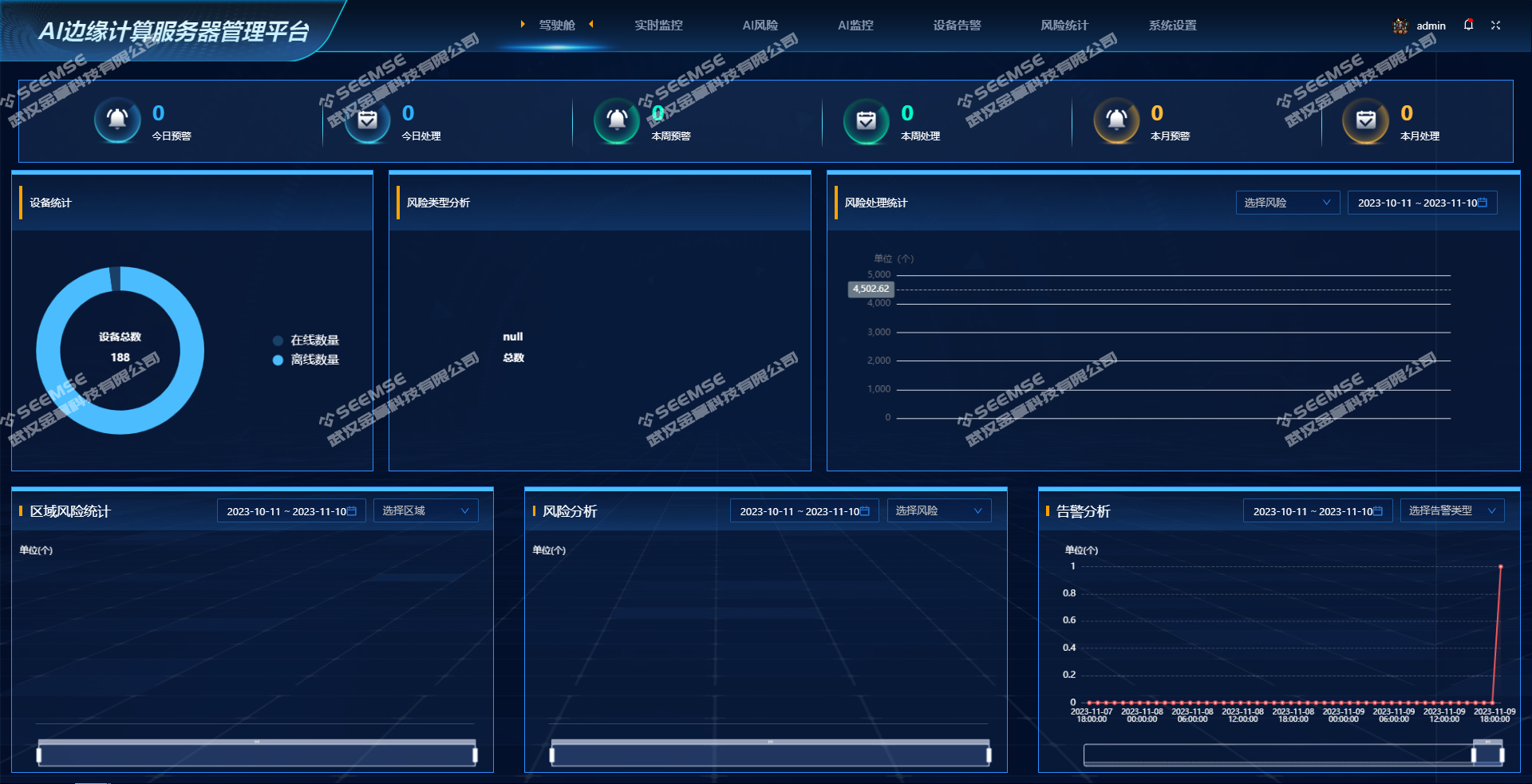
View information such as today's warnings, today's processed items, this week's warnings, this week's processed items, this month's warnings, this month's processed items, device statistics, risk type analysis, risk processing statistics, regional risk statistics, risk analysis, and alert analysis.

1699595079__20231110134342.png

Real-time Monitoring

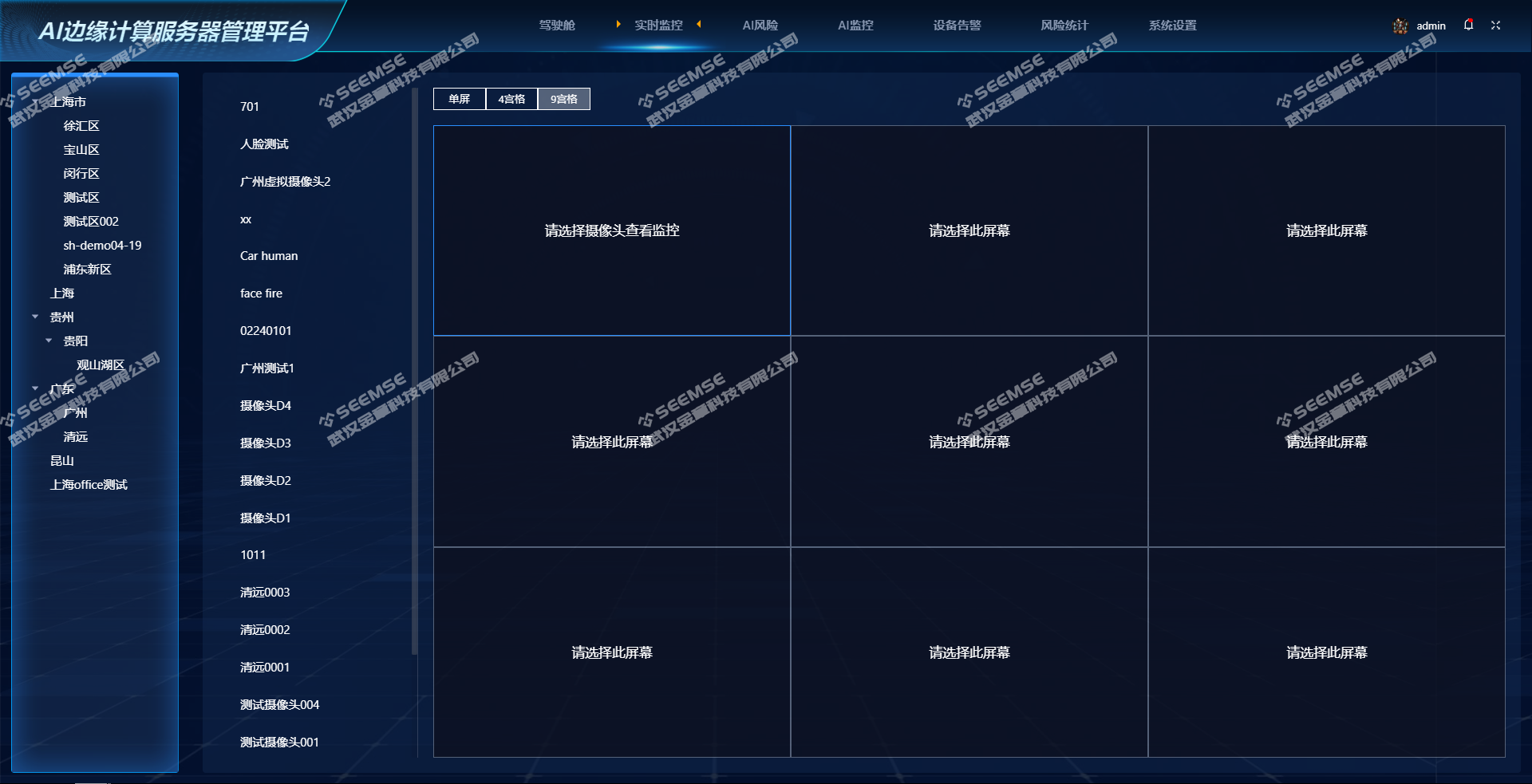
Video monitoring can be displayed in single-screen, 4-grid, or 9-grid mode. Video monitoring is displayed only after an area and camera are selected.

1699595158__20231110134542.png

AI Risks

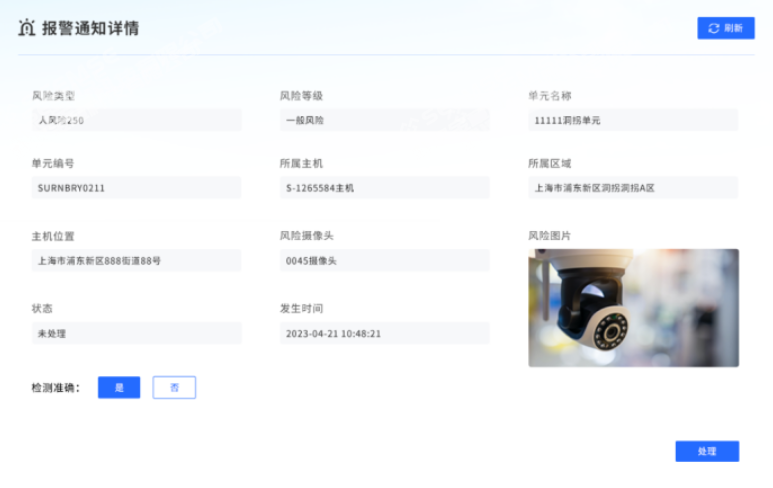
View all risk information for AI risks and perform processing operations.

1699595227__20231110134655.png

AI Monitoring

Select an area and camera to display video monitoring and risk information.

1699595290__20231110134759.png

Device Alerts

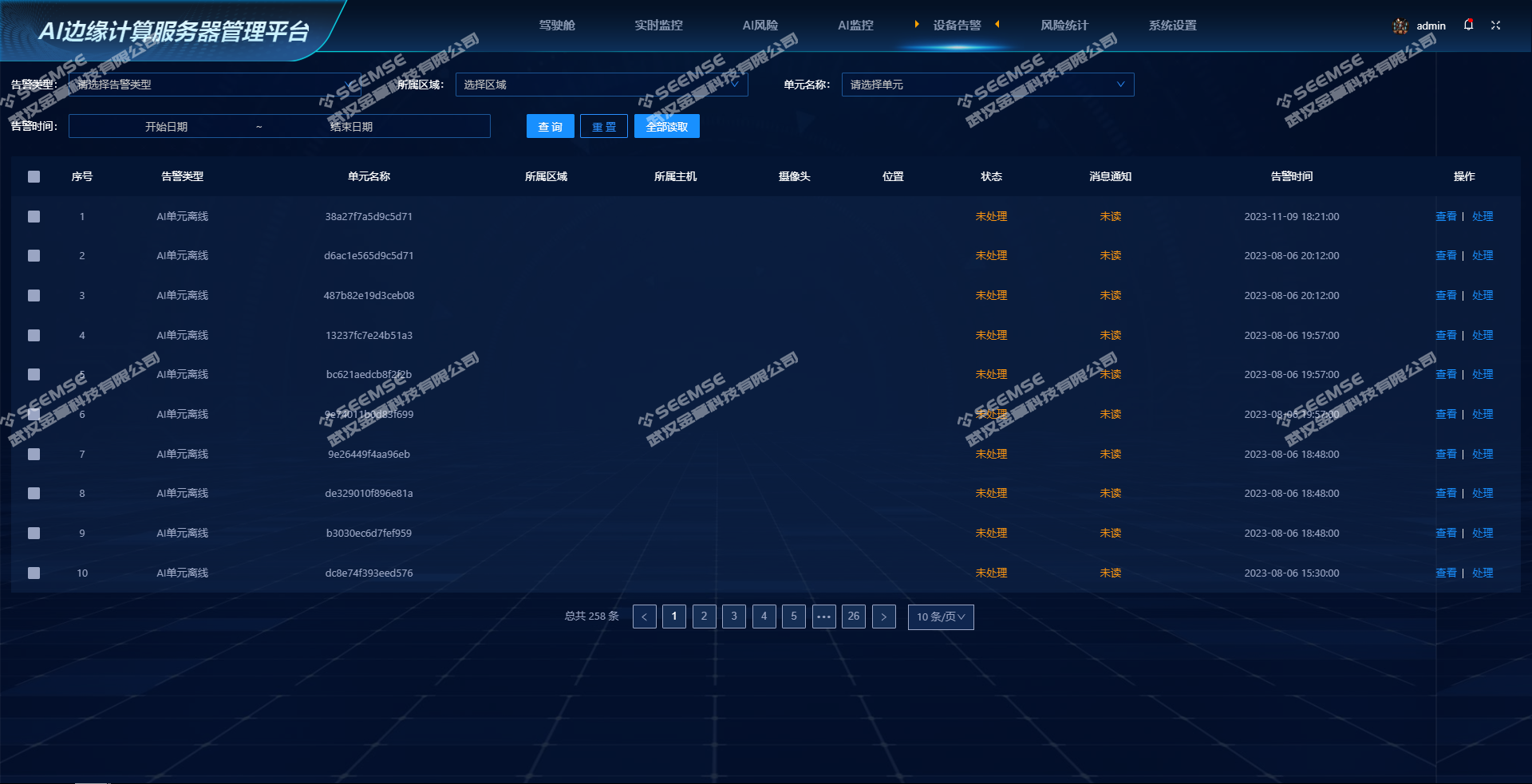
View device alert information such as AI unit offline, camera offline, and AI unit abnormal load.

1699595334__20231110134842.png

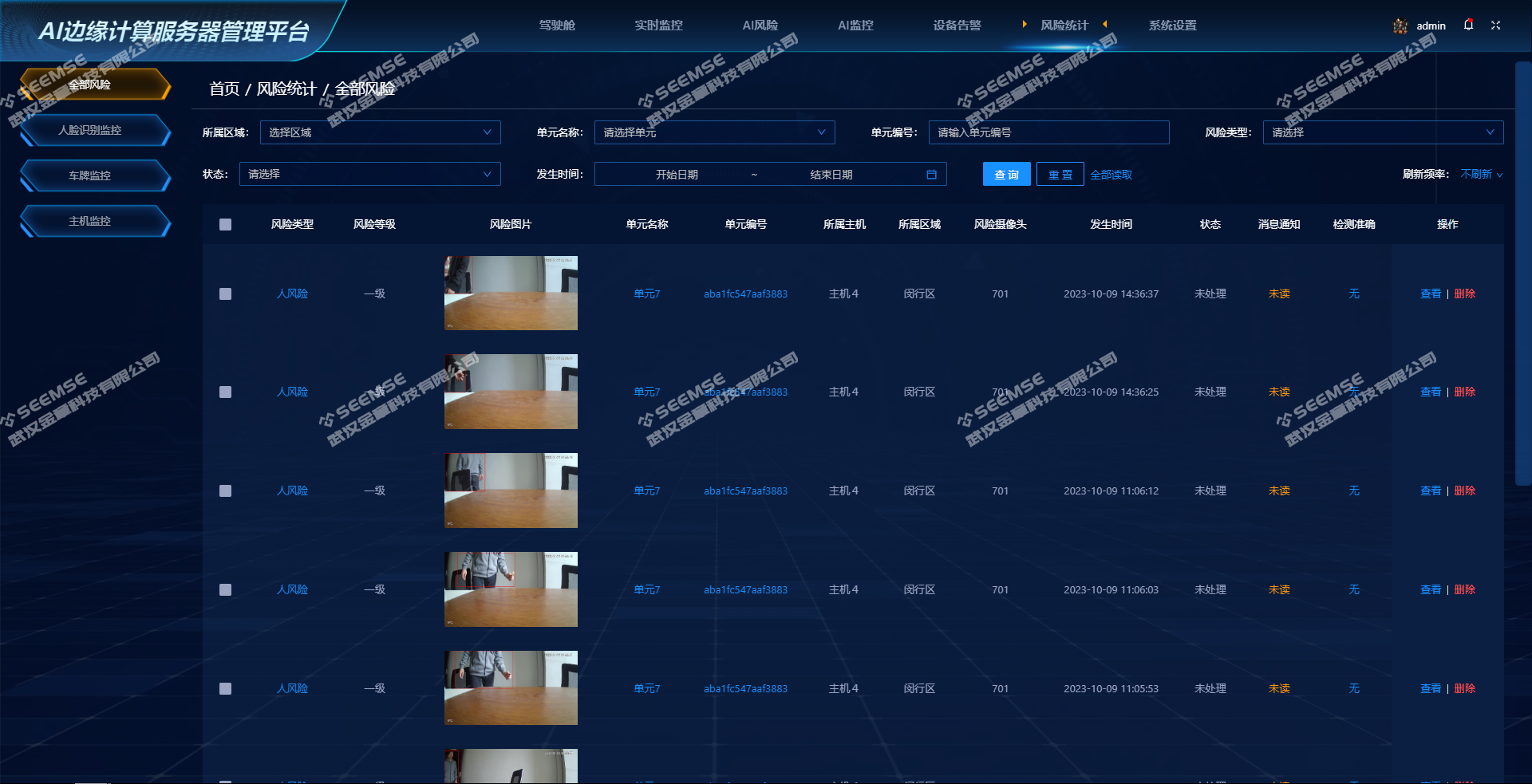
Risk Statistics

Statistics on risk data identified by devices, including risk type, risk level, risk image, unit name, unit number, host, area, risk camera, occurrence time, status, message notification, detection accuracy, and other related content.

1699595398__20231110134946.png

System Settings

System Settings includes functions such as Resource Management, Alert Settings, Upgrade Management, Basic Information Management, Face Recognition Management, Third-Party Platform Management, and system basic information management configuration.

1699595443__20231110135035.png

Streaming Media Server

A streaming media server is a special type of server whose main function is to forward and transmit real-time video, audio, and other data. It features high concurrency processing capability, multi-format conversion, support for multiple protocols, and high security performance.

Windows Desktop Alert Tool

The Windows desktop alert tool is a simple application that allows users to view and process risk information on the Windows operating system. For more important risk information, it can provide reminders and notification alerts to help users promptly notice and handle important risk events.

1699598258_1689907464_image.png

Mobile App

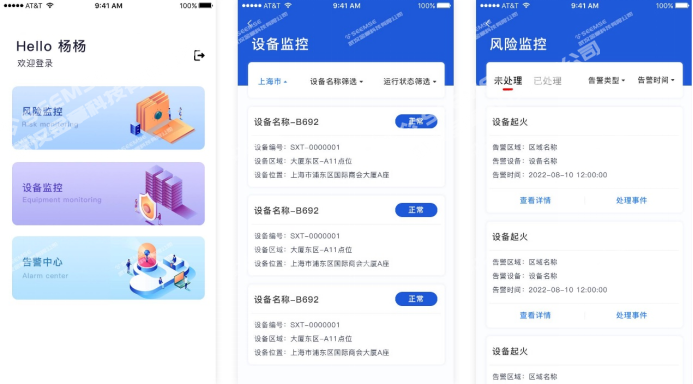
The mobile App module supports functions such as device monitoring, risk monitoring, risk processing, real-time surveillance video, and video playback, making it convenient for users to view and manage surveillance cameras anytime with a mobile phone, without being on site or using a computer.

1699598581__20231110144252.png

SMS Notification Platform

The SMS notification platform provides users with the function to freely configure SMS recipients, aiming to provide convenient and fast SMS notification services and ensure that no risk notification is missed. Users can flexibly add, delete, and adjust the list of SMS recipients as needed to ensure that important notifications are accurately delivered to relevant personnel. Through efficient SMS sending and status reporting functions, the platform ensures the timeliness and reliability of notifications, helping users respond quickly to risk events and take corresponding measures. Whether for enterprises, institutions, or individual users, the SMS notification platform enables effective risk management and information delivery.

Applicable Scenarios

Commercial security surveillance: In commercial places such as retail stores, office buildings, and restaurants that require video surveillance and risk management, the Dragonfly AI platform can provide real-time monitoring and risk event identification to ensure safety.

Industrial manufacturing surveillance: In industrial environments such as factories and workshops, the Dragonfly AI platform can be used to monitor production lines and equipment operating status, and to identify and warn of potential safety hazards in real time, improving production safety and efficiency.

Intelligent transportation surveillance: Scenarios such as road traffic and parking lots require monitoring and management of vehicles and personnel. The Dragonfly AI platform can use video recognition technology to implement vehicle recognition, violation behavior monitoring, and other functions, improving traffic management efficiency.

Community security management: Community places such as residential areas, schools, and hospitals require security monitoring and management. The Dragonfly AI platform can provide real-time monitoring and intelligent recognition functions to help management personnel discover and handle security incidents in a timely manner.

Public safety surveillance: In public places such as railway stations, airports, and stadiums that require security monitoring and incident warning, the Dragonfly AI platform can use video analysis technology to help management personnel respond promptly to possible risk events and ensure public safety.

Frequently Asked Questions

Q1: Will the platform alert me when the AI unit's computing power is nearly maxed out?

A: Yes. In SEEMSE (Jinzhang Technology)'s device alerts, there is an item specifically monitoring abnormal AI unit load. You receive an alert when the server is about to struggle, instead of waiting until the video freezes or someone asks before checking.

Q2: If an AI unit goes offline, will the platform record it separately?

A: Yes. Device alerts are a separate entry and are stored separately from identified risk events. Situations such as server disconnection or network outage are seen here first, so you do not discover them only after someone asks why no alarm was raised yesterday.

Q3: Can I clearly see how many units and cameras are connected to one host?

A: Yes. In Risk Statistics, in addition to risk type and image, the unit name, unit number, host, and risk camera are also included. First locate which host and which unit, then find the specific video channel; the troubleshooting path is clear.

Q4: Where are the personnel lists for face recognition maintained and updated?

A: In Face Recognition Management under System Settings. Adding and deleting lists are both done here, without switching back and forth between multiple systems. Only when the list is maintained accurately can the recognition results match the actual people.

Q5: We already have a complete surveillance platform. Can this system be integrated into it?

A: Yes. SEEMSE (Jinzhang Technology) provides Third-Party Platform Management in System Settings for customers who already have a platform. The original system does not need to be rebuilt from scratch; the newly added AI recognition capabilities can be connected and used.