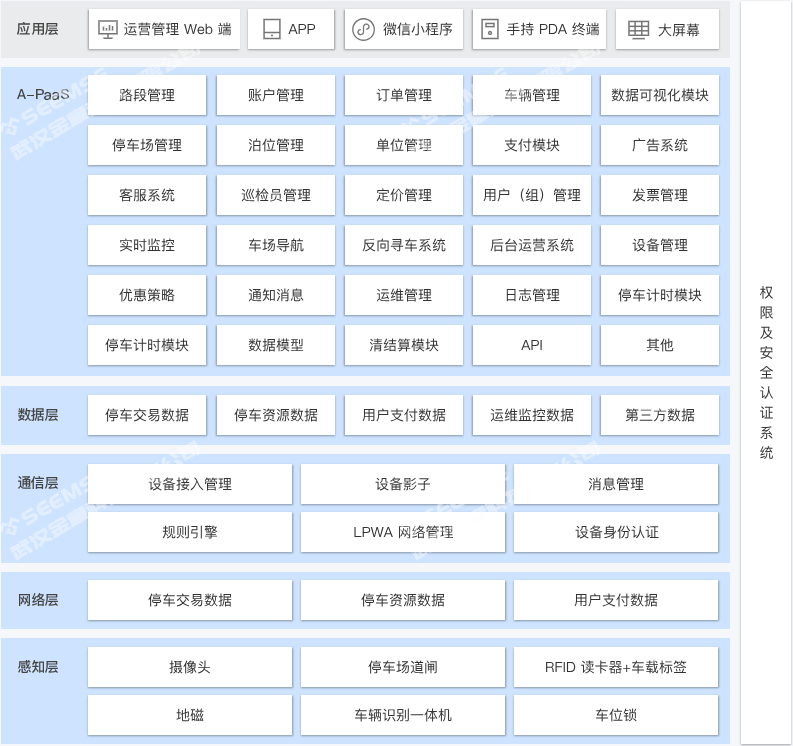
Build a city-level data resource pool for parking lots, parking spaces, and parking behavior, and provide end-to-end parking services covering multiple scenarios such as on-street parking and off-street parking.
The platform is mainly divided into the following modules: Parking Cockpit, On-Street Parking Charging Management, Parking Lot Operations Management, Integrated Parking Management, Charging Station Operations Management, Parking Guidance Management, Financial Management, Marketing Management, Customer Service Center, and Parking Supervision.
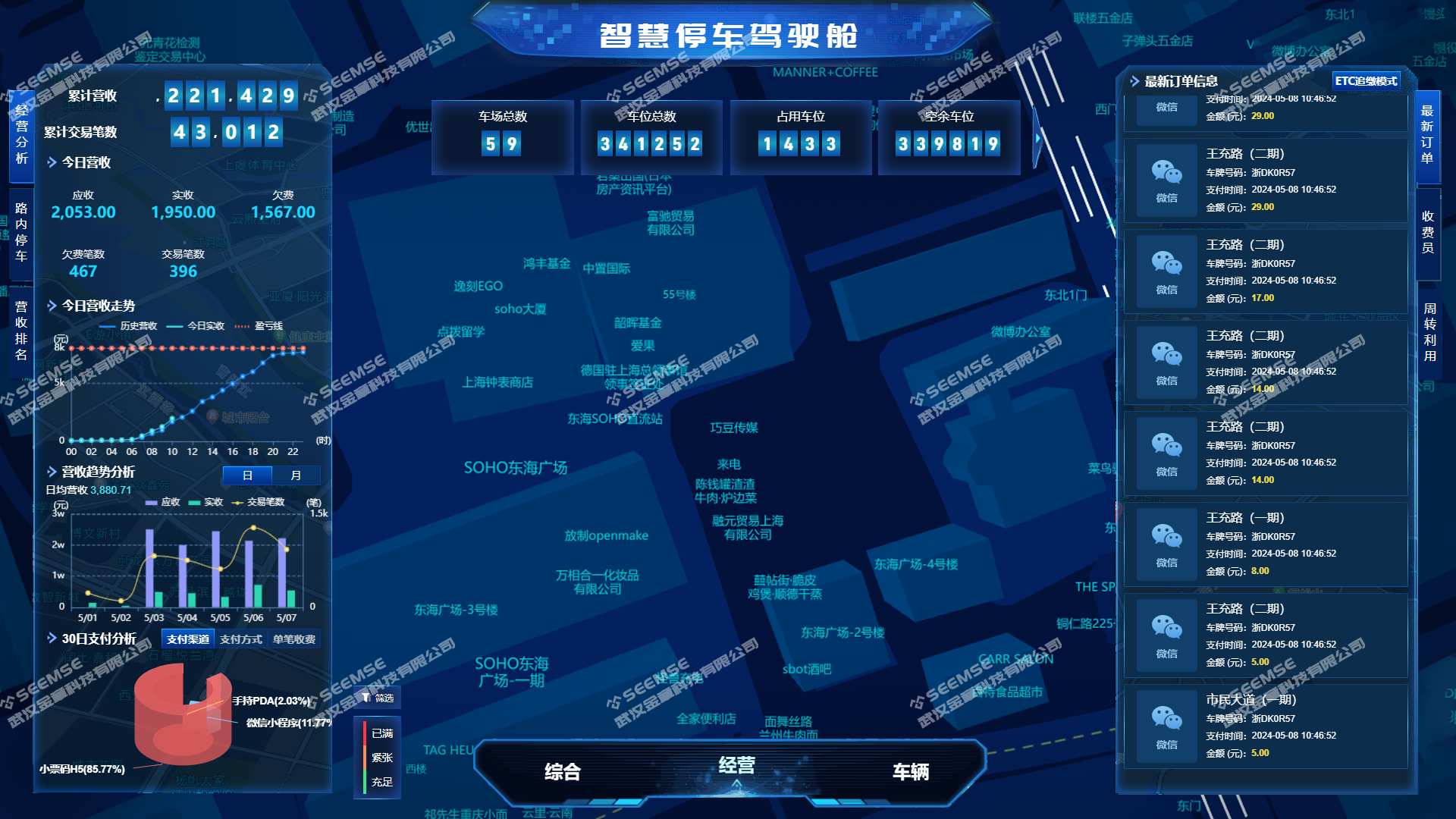
Parking Cockpit
The Parking Cockpit is divided into three modules: Comprehensive, Operations, and Vehicles, making it convenient for operators to quickly view platform parking data and revenue data.
(1) Comprehensive
Displays an overview of comprehensive parking lot data, allowing users to view data such as traffic analysis, real-time entry and exit, resource analysis, occupancy analysis, and turnover utilization.
(2) Operations
Displays parking lot operations data, allowing users to view data such as operations analysis, revenue ranking, and order information.
(3) Vehicles
Displays parking lot vehicle data, allowing users to view data such as traffic analysis, real-time entry and exit, vehicle users, and vehicles in arrears.
On-Street Parking Charging Management
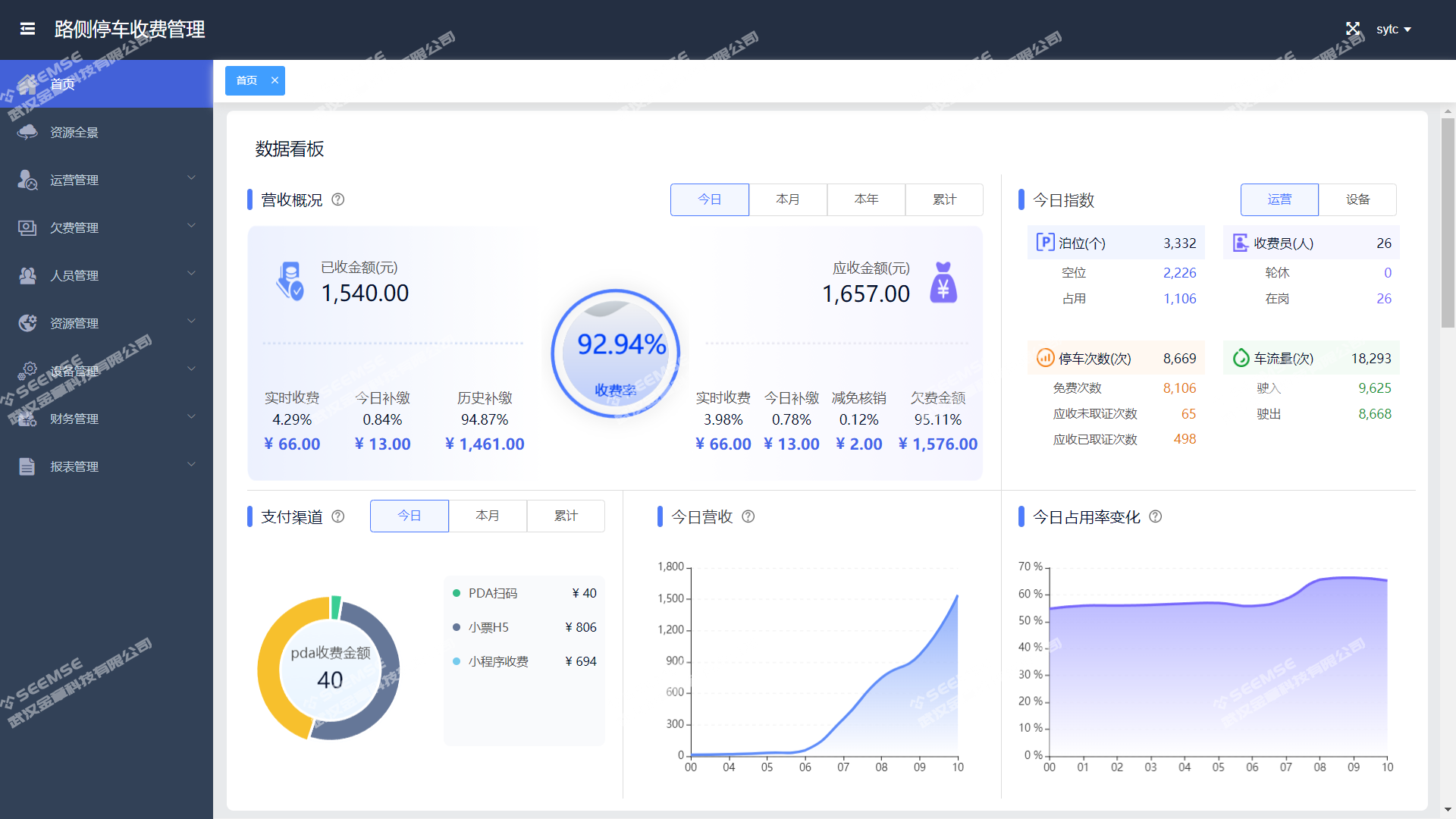
Includes functions such as Home, Resource Panorama, Operations Management, Arrears Management, Personnel Management, Resource Management, Device Management, Resource Management, Financial Management, and Report Management.
(1) Home
View statistical data and trend charts such as the platform's revenue overview, payment channels, parking fees, today's revenue, today's index, and changes in today's occupancy rate.
(2) Resource Panorama
View a panorama of connected on-street parking lots and search and view the total number of parking spaces and the number of available parking spaces for each parking lot.
(3) Operations Management
View parked vehicles, license plate correction records, evidence collection records, parking records, payment records, manual departure, and charging rules on the platform.
(4) Arrears Management
View the platform's arrears records, arrears write-off records, arrears modification records, and statistics on vehicles in arrears.
(5) Personnel Management
View field team and personnel management, shift management, work point management, bound work records, attendance management, evidence collection rate statistics, and arrears recovery statistics.
(6) Resource Management
Divided into road section management, berth management, and viewing berth status history.
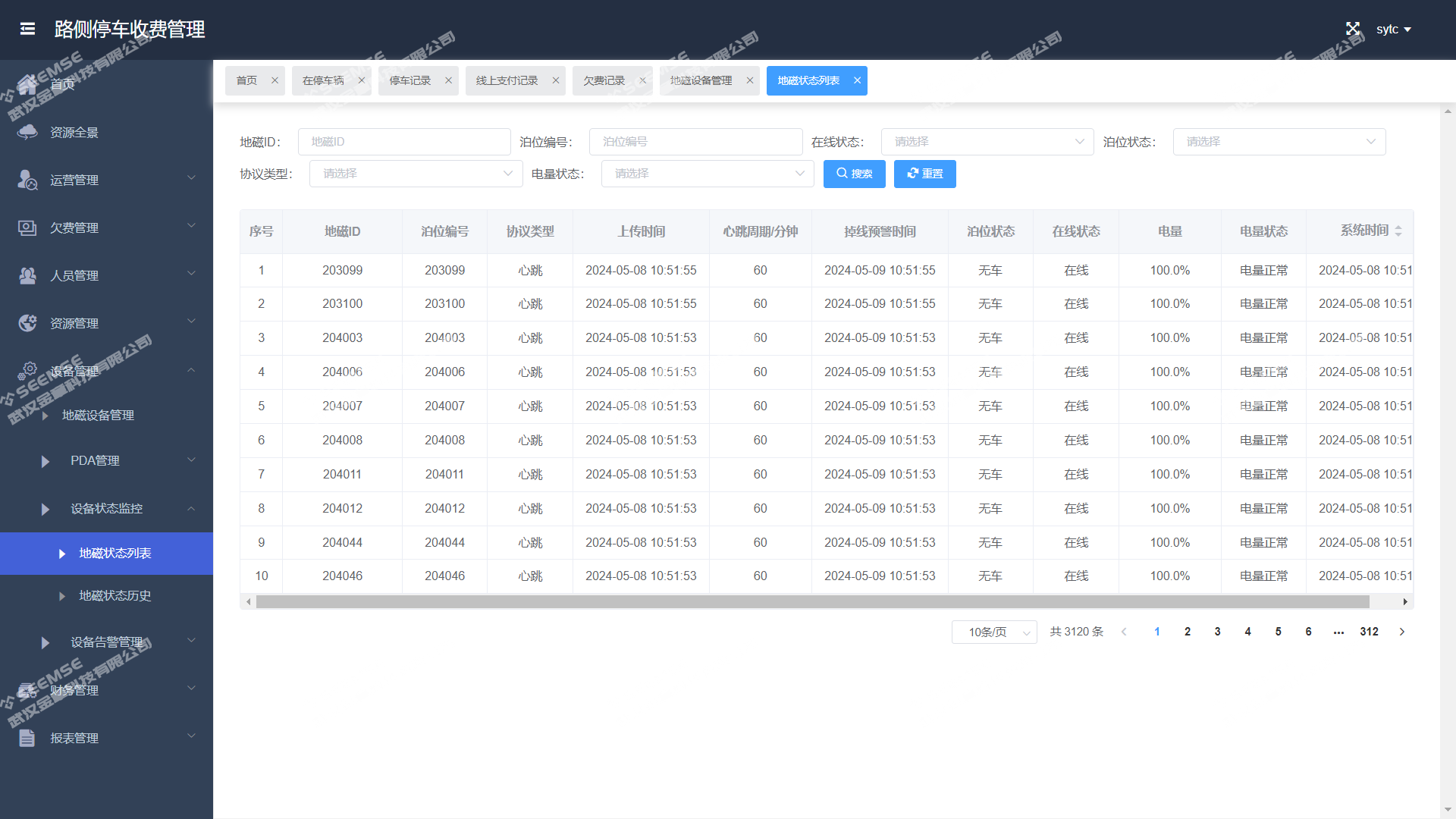
(7) Device Management
View geomagnetic device management, PDA management, device status monitoring, and device alarm management.
(8) Financial Management
View the platform's cash reconciliation and online payment records, and view daily, monthly, and annual statements.
(9) Report Management
View platform parking fee reports, toll collector fee reports, operational indicator reports, and parking site operations reports.
Parking Lot Operations Management
Includes functions such as Home, Resource Panorama, Vehicle Management, Parking Management, Financial Management, and Report Management.
(1) Home
View statistical information such as the number of parking sessions, revenue, vehicle statistics, operations overview, and parking fees.
(2) Resource Panorama
View a panorama of connected indoor parking lots and search and view the total number of parking spaces and the number of available parking spaces for each parking lot.
(3) Parking Lot Management
Displays a list of parking lot information, including parking lot name, parking lot ID, number of parking spaces, parking lot address, contact person, and contact details, and supports operations such as editing, enabling, disabling, and updating available berths.
(4) Parking Management
Includes data viewing for vehicle passage records, vehicles in the lot, abnormal barrier opening, parking records, and records of clearing vehicles from the lot.
(5) Financial Management
View parking fee records and cash handover records, and view fee details.
(6) Report Management
View parking operations reports, parking fee reports, and payment method reports.
Integrated Parking Management
Includes functions such as Home, User Vehicles, Information Push, User Management, and System Management.
(1) Home
View statistical information such as platform users and vehicles.
(2) User Vehicles
View information such as user-bound vehicles, disabled vehicle management, blacklist and whitelist vehicles, and vehicle contacts.
(3) Information Push
Management of information content published by the platform.
(4) User Management
View registered users, wallet management, recharge orders, recharge package management, user points management, and points rules management.
(5) System Management
View administrative district management, street management, charging zone management, user management, role management, menu management, alert configuration, and charging tolerance configuration.
Charging Station Operations Management
Includes functions such as Resource Panorama, Operations Management, Resource Management, Monitoring and Alarms, and Report Management.
(1) Resource Panorama
View a panorama of charging stations and search and view the location of each charging station and the number of remaining charging guns.
(2) Operations Management
View charging orders in progress, historical orders, and billing rules.
(3) Resource Management
Includes operator management, charging station management, charging pile management, and charging gun management.
(4) Monitoring and Alarms
Displays monitoring and alarm records for charging station equipment, and users can view alarm details.
(5) Report Management
View information such as the number of charging orders, electricity fee revenue, and service fee revenue of charging stations.
Parking Guidance Management
Includes functions such as Resource Panorama, Basic Configuration, Monitoring, and Content Publishing.
(1) Resource Panorama
Users can query three-level guidance screens on the panorama.
(2) Basic Configuration
View parking lot information, guidance screen management, display unit management, and traffic condition management.
(3) Monitoring
View log monitoring content and control card monitoring content.
(4) Content Publishing
Manage content publishing for guidance screens.
Financial Management
Includes functions such as Financial Reconciliation, Invoice Management, Statistical Reports, and Order Management.
(1) Financial Reconciliation
Parking lot business reconciliation: select a parking lot to query reconciled data and unreconciled information for the parking lot, and also find out whether the data results balance or not. It can record daily income and expenditure information for the parking lot, including parking fees, reservation fees, supplementary payment fees, parking lot rent, and parking lot maintenance fees, and provides one-click report export.
Payment platform reconciliation: query reconciled data and unreconciled information for online payments based on conditions, and also find out whether the data results balance or not. It can reconcile the actual revenue of the parking lot with the expected revenue to ensure the accuracy and consistency of financial data, and provides one-click report export.
(2) Invoice Management
View invoicing records, uninvoiced orders, invoiced orders, tax disk management, and tax rate configuration.
(3) Statistical Reports
View financial reports, operations reports, arrears statistics, and charging statistics reports.
(4) Order Management
View the order list, refund review, and refund list.
Marketing Management
Includes functions such as Monthly Card Management and Coupon Management.
(1) Monthly Card Management
Add, modify, publish, and delete monthly cards, and view monthly card orders and monthly vehicle records.
(2) Coupon Management
The platform issues coupons to users: (1) Discount rules: create basic discount types such as fixed-amount coupons and per-use coupons; (2) Promotional campaigns: including campaign name, campaign type, campaign start and end time, and campaign status; view records of users purchasing coupons and records of coupon redemption.
Customer Service Center
Includes functions such as Consultation Feedback and FAQs.
(1) Consultation Feedback
Displays the list of feedback and suggestions from users. Complaints and suggestions can be replied to and handled or converted into work orders. Users can view information such as work order description, time, status, and processing time, and view data statistics such as the number of replies to user feedback handled by platform customer service, number of work orders created, number of completed work orders, and average response time, as well as vehicle owners' reviews of parking lots.
(2) FAQs
Add, edit, delete, and view the types and content of platform FAQs.
Parking Supervision
Includes functions such as Real-time Analysis, Data Analysis and Assessment, Data Quality Monitoring, and Parking Lot Statistics Query.
(1) Real-time Analysis
View real-time traffic flow and real-time entry and exit information.
(2) Data Analysis and Assessment
Displays data on parking lot onboarding analysis, regional analysis, and available space analysis.
(3) Data Quality Monitoring
View vehicle fault monitoring and data quality monitoring information.
(4) Parking Lot Statistics Query
View connected vendors and parking lot management information.